A Telegram bulk sender that doesn't burn your account.
Personalize with {firstName}, attach media, schedule ahead, rotate across accounts. Twelve anti-ban mechanisms run underneath, so you can think about your message instead of Telegram's rate limits. Pro from $15/month, with a 7-day money-back guarantee.
Four steps, one browser tab
Everything lives inside the Chrome extension. Nothing to install on a server, no Python scripts, no command line.
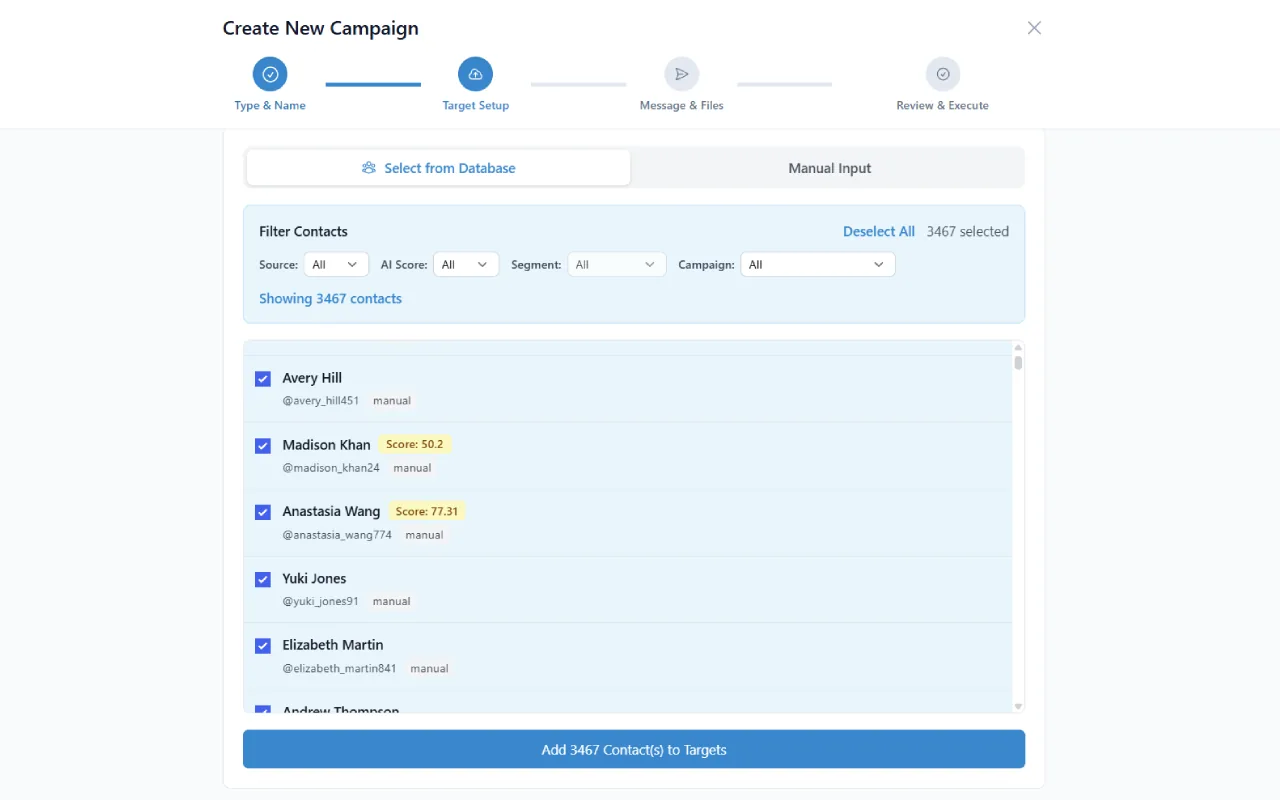
Pick your recipients
Choose a source in the Campaign Builder: upload a CSV, pull from a Telegram group or channel you've scraped, paste a list of usernames, or use a saved segment from your Contact Database. Deduplication runs automatically — the same phone or username never gets messaged twice in a campaign.
- CSV columns auto-mapped to personalization variables
- Filter by AI lead score, last-seen, or custom segment
- Live recipient count updates as you filter
Compose your message
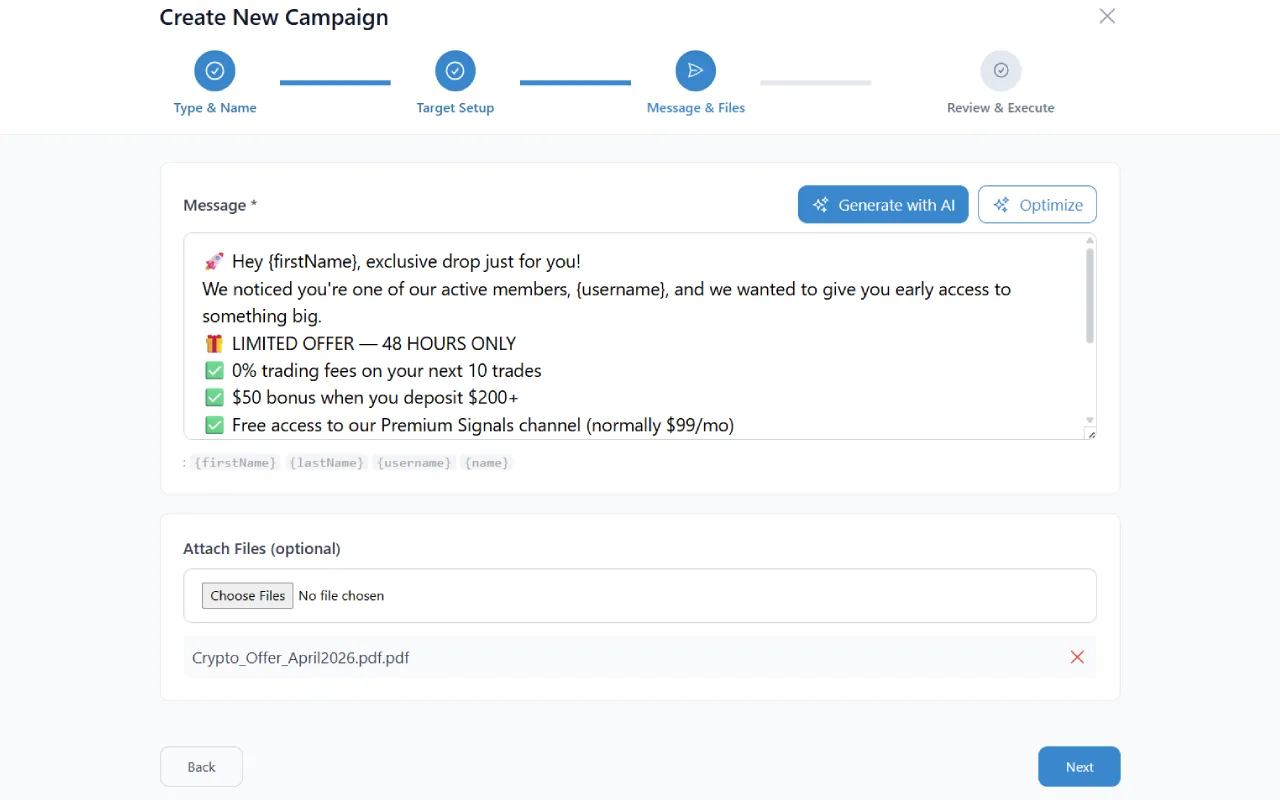
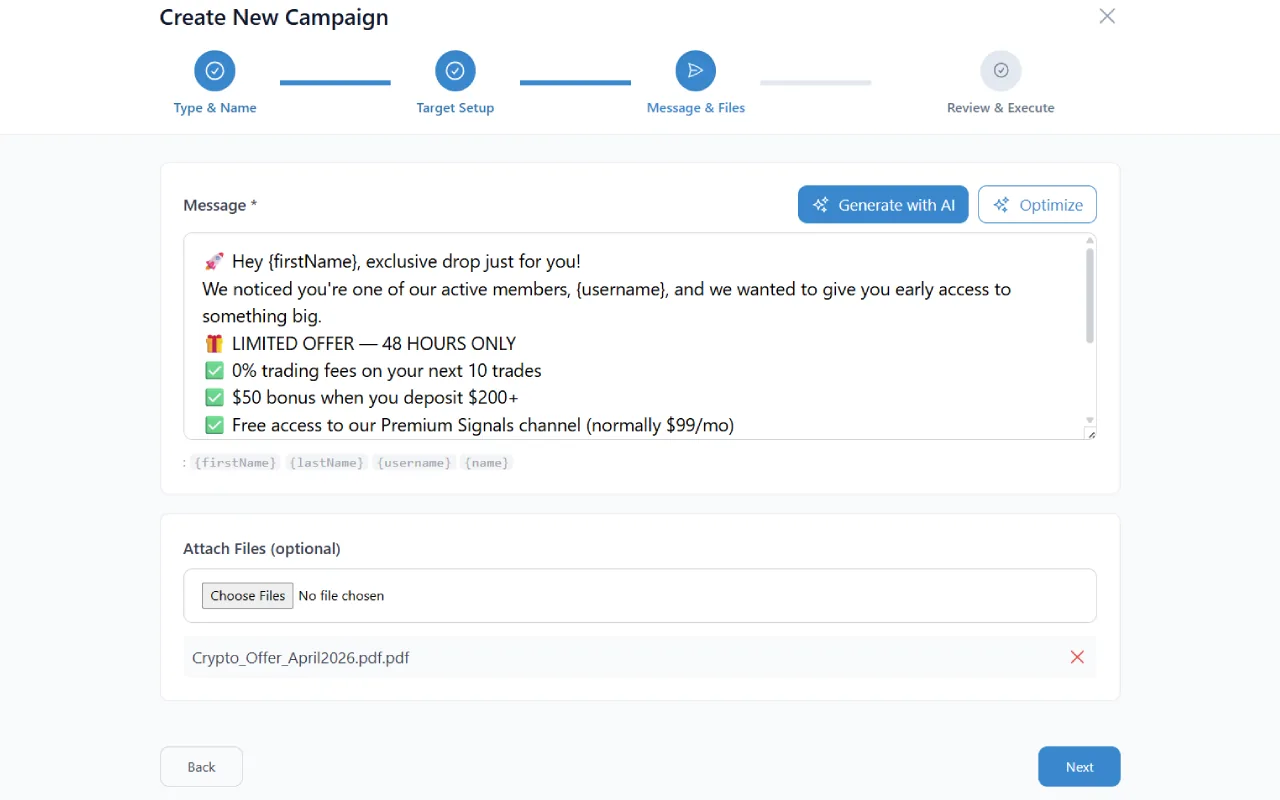
Write your message with personalization tags — {firstName}, {username}, or any custom CSV field. Attach a media file (image, video, PDF, voice note, document). Before sending, TeleSender previews the first 5 messages so you can sanity-check the substitutions. If the preview looks wrong, fix the template; the whole campaign never launches with broken placeholders.
- Unlimited personalization variables
- Optional AI optimizer: rewrite for higher engagement
- Live preview of rendered messages
Pick your safety profile
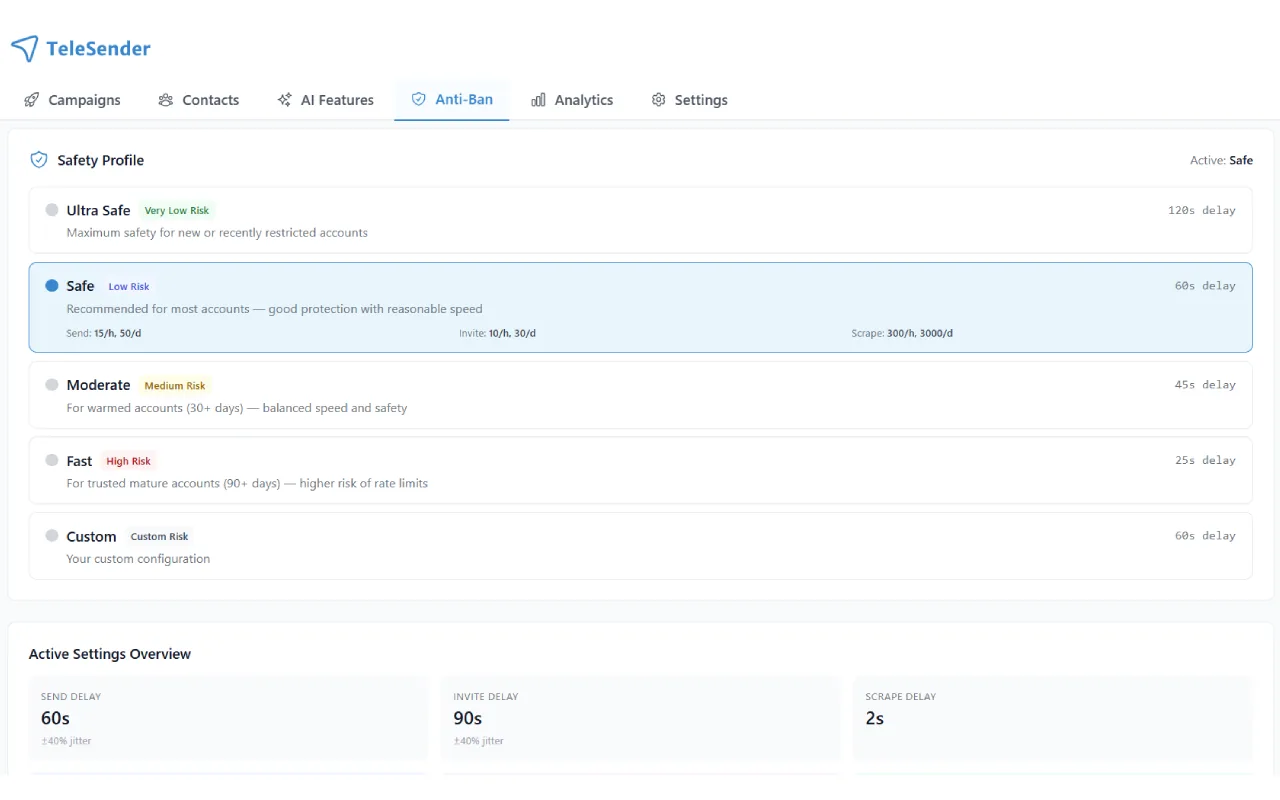
Select from Stealth, Safe, Balanced, Fast, or Aggressive. Each profile retunes all 12+ anti-ban mechanisms together — delays, session warming, human behavior simulation, error backoff windows. Stealth is the slowest (good for a fresh account); Aggressive is the fastest (fine for an account that's been running messages cleanly for 30+ days). You can change profiles mid-campaign — the next message respects the new settings.
- 5 pre-built profiles, no manual tuning needed
- Live account health score gates the faster profiles
- Switch profiles mid-campaign with zero downtime
Launch and watch it run
Hit launch. TeleSender sends on your schedule (immediately, or at a future date on Pro+). The live campaign view shows progress per recipient, delivery status, errors, and a real-time send rate. If Telegram throws a FloodWait or PeerFlood, the sender pauses automatically and resumes when it's safe — no manual intervention, no lost progress. When the campaign completes, you get a full log you can export to CSV for attribution.
- Real-time progress, status codes, error reasons
- Pause, resume, duplicate, re-run, or cancel any time
- CSV export of the full recipient log
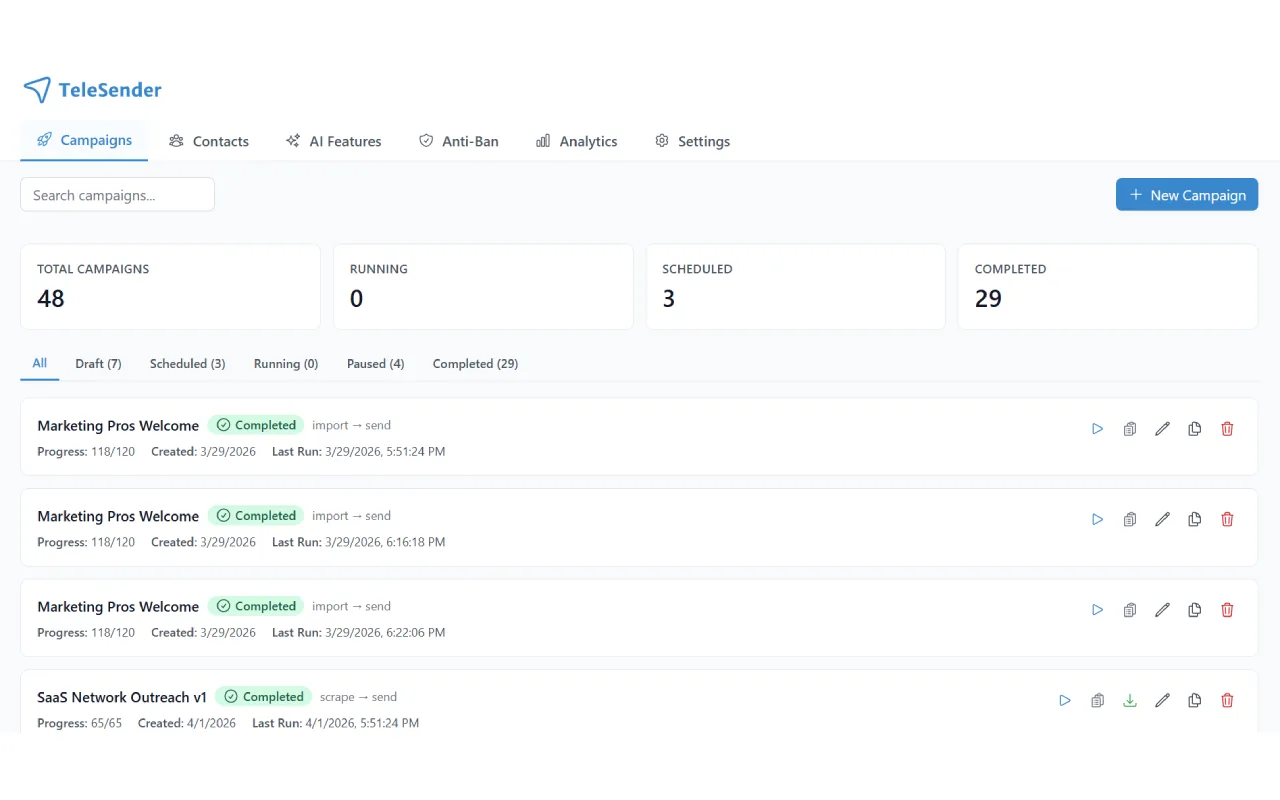
Four campaign types
Pick the flow that matches your workflow — they all share the same anti-ban layer, scheduling, and reporting.
Import & Send
Upload a CSV of usernames or phone numbers, pick a message template, and hit send. Perfect for outreach lists you already own.
Scrape & Send
Scrape a group or channel first, then send directly to the extracted members — all in one workflow, no manual CSV exports.
Bulk Invite
Invite scraped users to your group or channel. Built-in rate-limit protection and auto-skip for already-joined users.
Scrape Only
Run pure scraping campaigns without sending — feed the output into your CRM, email marketing tool, or other workflow.
How the anti-ban stack actually works
The simple version: Telegram tells you when you're sending too fast. Most tools ignore those signals and keep going until the account gets restricted. We built the sender to read those signals and back off on the first warning.
Adaptive rate limiting
Delays adjust to whatever Telegram is responding with. If the server gets chatty about limits, we slow down before the limits turn into penalties. If everything's clean for a few hours, we speed up again.
Session warming
New accounts don't go to full throttle on day one. Daily caps start low and grow over the first 72 hours, which is roughly how a normal human's usage pattern ramps.
Human behavior patterns
Randomized micro-delays between messages. Typing indicators on longer copy. Occasional read receipts on inbound messages. None of it is bullet-proof on its own, but stacked together they're indistinguishable from organic usage.
Automatic error recovery
Telegram has around a dozen error codes that mean 'slow down' in different ways: FloodWait, SlowMode, PeerFlood, and so on. Each one has its own tailored backoff. You don't need to know the difference — the campaign pauses and resumes on its own.
5 safety profiles
Stealth, Safe, Balanced, Fast, Aggressive. One slider controls all twelve mechanisms at once, so you don't have to tune twelve knobs. You can move the slider mid-campaign if your account health changes.
Account health dashboard
Every connected Telegram account gets a live health score. Green is fine. Yellow is a warning — ease off. Red means stop using that account for a while. We surface it before Telegram does.
Everything in the bulk sender
Personalization variables
Unlimited {placeholders}. Auto-map from CSV columns or custom fields in the Contact Database.
Media attachments
Images, videos, voice notes, PDFs, stickers — one attachment per campaign, up to Telegram's full size limits.
Campaign scheduling
Launch campaigns at a future date and time. Pro and Business plans.
Smart Account Rotation
Distribute messages across multiple Telegram accounts. Auto-switches when one hits a rate limit. Pro+ only.
Auto-retry & recovery
Failed messages retry with tailored backoff. Errors don't stop the campaign.
CSV log export
Download per-recipient delivery log for attribution or CRM import.
AI message optimizer
Paste your draft, get an improved version with engagement and spam-risk scores.
Contact database
Auto-save every sent recipient with status. Filter, segment, re-target later.
Account health dashboard
Per-account live score. Red/yellow/green signal with drill-down to raw Telegram responses.
Three reviews from the Chrome Web Store
Copy-pasted from the listing, unedited. Read the reviews →
★★★★★“Response rate tripled once I stopped mass-messaging and let the AI pick the 200 most engaged users instead.”
★★★★★“Excellent software. Intuitive interface, quick to deliver promotional content, and the anti-ban feature is really good.”
★★★★★“Everything I need in one place — usernames scraper, bulk message sender, group bulk inviter.”
Bulk sender FAQ
Will my Telegram account get banned?
Probably not if you use the defaults. We connect through the same official API that Telegram's own apps use and we respect the same limits — there's no workaround involved. Most users running the Safe profile never see a restriction. If an account does start getting warnings, the anti-ban system pauses it automatically so the issue doesn't snowball into a ban.
How do personalization variables work?
Write your template once with placeholders like {firstName}, {lastName}, {username}, or any custom CSV field. Upload your contact list and TeleSender maps each variable to a column. Every outgoing message is rendered individually at send time. You always see a preview of the first five messages before launching, so broken placeholders never make it into a real campaign.
Can I attach images, videos, or PDFs?
Yes. One attachment per campaign, up to Telegram's size limits (2 GB if you have Telegram Premium, 1.5 GB otherwise). Images, video, voice notes, documents, stickers — all of it. The file uploads once and gets re-sent natively to each recipient, so you're not re-uploading the attachment 500 times.
What happens when I hit my daily message cap?
The campaign pauses itself. Remaining recipients sit in the queue until 00:00 UTC, then it picks up automatically from where it stopped. No overage, no manual restart, no data loss.
Can I schedule a campaign to run later?
Yes, on the Pro and Business plans. Pick a date and time in the Campaign Builder, TeleSender handles the rest, and you get an email when it finishes.
Can I pause or duplicate campaigns?
Pause, resume, duplicate, and re-run are all one-click buttons on every campaign. Duplicate is especially useful for A/B tests — clone a campaign, tweak one variable, run it against a fresh list.
Does the bulk sender work across multiple Telegram accounts?
On Pro and Business plans, yes. Smart Account Rotation distributes messages across your connected accounts based on each account's age-based daily ceiling. If one account hits a rate limit mid-campaign, the next one picks up without a manual intervention.
Do recipients know this was a bulk message?
No. Every message is sent as a native 1:1 chat from your account. There's no footer, no branding, no broadcast metadata. The recipient sees a normal DM that's indistinguishable from one you'd type by hand.
Send your first campaign today
Install the Chrome extension, connect your Telegram account, and launch your first campaign. Pro from $15/month with a 7-day money-back guarantee.